Wallet balance
Paid and bonus balance shown separately. The badge turns red once your balance drops below the threshold you set.
Wallet balance, today's spend and per-API-key spend, a 30-day chart and daily budgets — right in your browser toolbar. No API key, no password, no separate sign-in.

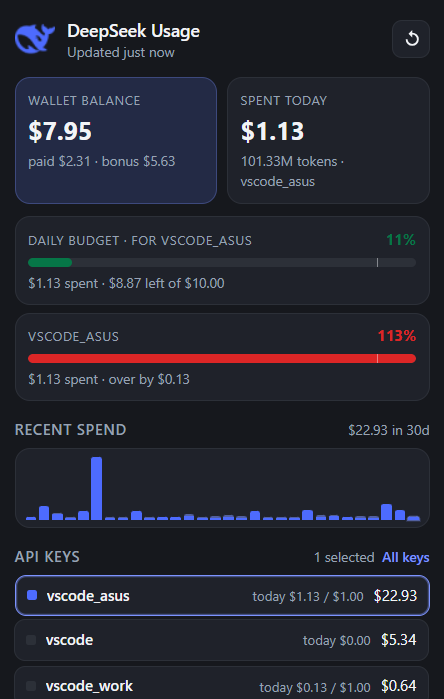
The extension repeats only the requests the DeepSeek web console makes and turns them into a readable dashboard.
Paid and bonus balance shown separately. The badge turns red once your balance drops below the threshold you set.
Today's spend and token count. “Today” is fetched on its own so the number is accurate until the day rolls over.
See which key costs the most. The badge and the chart can be scoped to a single key or any selection of keys.
Daily bars for the selected window. Click keys in the list and the bars become stacked segments with a colour legend.
Spend today, spend in the period, balance or tokens — you decide what the toolbar icon shows.
Data refreshes in the background on a schedule (once a minute by default) or not at all. A manual refresh button is always there.
Set a daily budget for the whole account and one for each key. The badge turns green, orange or red according to the budget closest to its limit.
$1.13 spent · $8.87 left of $10.00
$1.13 spent · over by $0.13 of $1.00
$0.13 spent · $0.87 left of $1.00
Budget for this key is off
No separate sign-up and no API key — the extension reuses the session already open in your browser.
One click from the Chrome Web Store. Requires Chrome 116 or newer.
Sign in — the session is picked up automatically.
The first refresh happens by itself. After that data updates in the background.
Dark interface, dense grid and not a single unnecessary button.
Balance, today's spend and tokens, budget bars, chart and the list of API keys.
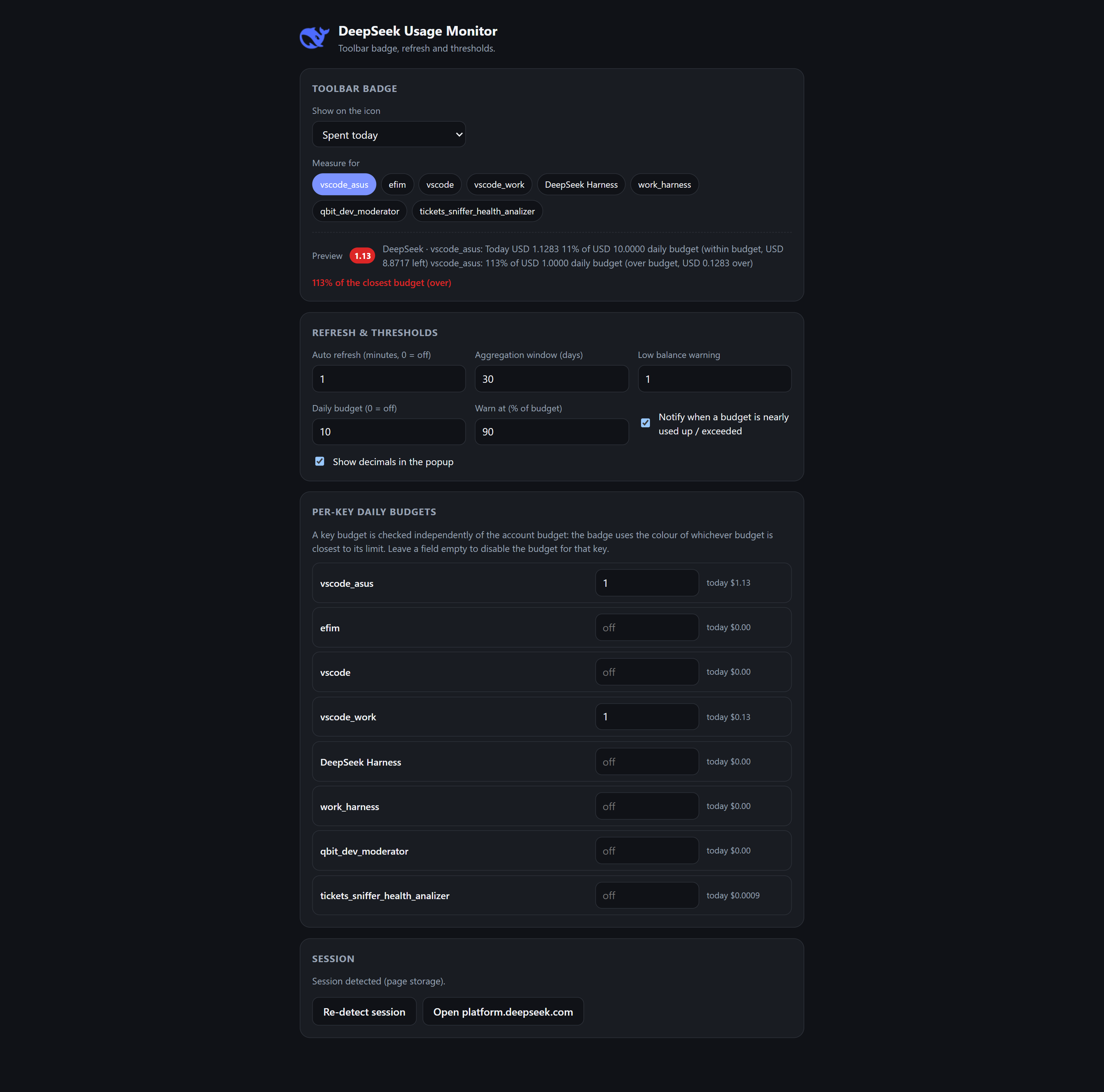
Badge metric, key selection, refresh interval, aggregation window, budgets and thresholds.
The extension talks only to platform.deepseek.com and makes the same read-only requests the DeepSeek web console does. No API key and no password are stored — it reuses the session already open in your browser. All data stays on your own computer: no telemetry, analytics, ads or third-party sharing. Remove the extension and the data is gone.
Only the console endpoints needed for balance and spend.
No external servers, CDNs or error reporting.
Settings and cached figures live in chrome.storage.local.
MIT licence, sources on GitHub — every line can be checked.
No. The extension uses the session already open in your browser on platform.deepseek.com. No API key or password is requested or stored.
No. Requests go only to platform.deepseek.com; everything else stays local. No analytics, telemetry or ads.
The DeepSeek WAF token expired. Open platform.deepseek.com once — the token renews itself and the extension picks it up on the next refresh. The extension never opens tabs on its own.
The session was not found or has expired. Sign in to the platform, then press “Re-detect session” in the extension settings.
The platform's daily series does not include the current day until it ends, so the extension takes “today” from the hourly series and adds it to the chart separately.
Chrome and Chromium-based browsers only (Edge, Brave, Arc) — Chrome 116+ is required.

The extension is completely free and open source.
Your support is much appreciated. Every donation goes into developing projects and keeping the infrastructure running 💙
Donate